CraftLaunch
Pressure & power washing companies

Pressure washing website design, built and run for you

Somebody looks at their driveway after a wet spring, or gets a letter from the HOA about green siding, and searches for a power washing company nearby. They call the one whose photos show real clean concrete and whose number is easy to tap. We build that website.

We design and write your site with your job photos, a quote request form and the towns you cover. $69 to launch, then $35 a month. No contract.

$69
one-time setup
$35/mo
hosting, security, edits
  • Live in 1–3 business days after one onboarding call.
  • Month-to-month. Cancel anytime, effective at the end of your paid month.
  • Done for you. No page builder to learn and nothing for you to write.
What the site has to do

What a pressure washing website needs to get right

People hiring a washing company can see the problem from their front yard. What they can’t see is whether you will do a good job without wrecking anything. Your site has to settle that quickly.

Show the before and after

This work sells on the picture. A black driveway with one clean stripe down the middle beats any paragraph.

Make asking for a price easy

You are often on a roof with the machine running. A short request form catches the people you can’t pick up for.

Explain how you wash siding and roofs

Homeowners worry about stripped paint, broken tiles and dead shrubs. A plain line about soft washing answers that before they ask.

Plan for the season and the repeat job

Spring pollen and summer mildew bring the rush; in the North, freezing weather ends it. Annual house washes and storefront accounts even it out.

Few calls in this trade are true emergencies, but plenty are rushed: a house listing Friday, a graduation party, an inspection next week. If you can fit those in, say so near the call button. Commercial customers want early-morning or after-close scheduling and a certificate of insurance, so if you do both kinds of work, the site should speak to both.

Free checklist

What to put on your pressure washing website (checklist)

Use it whether you build with us, hire someone else or do it yourself. Each item is something customers look for before they call, or ask about once they do.

  • Your phone number in the header, tappable. Use the same number as your Google Business Profile and trailer wrap. Two numbers make people wonder which is real.
  • A quote request that asks the right things. Address, what needs washing and roughly how big. A photo of the driveway or roof streaks saves you drive-out estimates on small jobs.
  • Each surface and service on its own line. House washing, roof soft washing, driveways and concrete, decks and fences, pavers, gutters, storefronts, fleet washing. List only what you actually do. Each one is its own search.
  • How you wash, in one or two plain sentences. Say when you use low pressure and a cleaning solution instead of high pressure, and that you wet down plants before and rinse them after.
  • Before-and-after photos from your own jobs. Same spot, same angle, town in the caption. Stock photos of a stranger’s driveway prove nothing.
  • Your insurance, and how to get a certificate. Say you carry liability insurance. Property managers and HOAs will ask for a certificate, so say how to request one.
  • Any license or registration you hold. Some states and cities require a contractor or business license for exterior cleaning, sealing or roof work. Check your state’s and city’s rules and show the number if you have one.
  • How you handle wash water on commercial jobs. Many cities limit what can run into storm drains. If you recover or divert water, say so, after checking your local stormwater rules.
  • The towns and zip codes you cover. In plain text, not only a map image. Mention any minimum charge or trip fee for the far end of your area.
  • How your pricing works. Per square foot, by house size or a flat minimum. No price list needed, but it saves calls from people expecting a $50 house wash.
  • Repeat service, if you offer it. An annual house wash, monthly dumpster pads for restaurants. Say what is included and how often, so one job becomes a yearly customer.
  • A link to your Google reviews. Reviews that mention a clean driveway and untouched plants beat any claim you write yourself.

Rather hand it off? We go through these on the onboarding call and put what applies on your site. We only publish what you give us.

What's included

What you get for $69, then $35 a month

One plan. No setup tiers, no contract, no extra charge for edits.

  • Custom website designed and written for you. Desktop, phone and tablet. We write the text from your services and your real Google reviews.
  • Tap-to-call buttons and a contact form. Every visit is one tap from a phone call, and people who would rather type can tell you what needs washing.
  • Room for your job photos. Before-and-after pairs and photos of your rig and crew. Send new ones whenever you like.
  • Local SEO setup. Your city and services in every page title, your service area and map on the site, business details marked up for Google, linked to your Google Business Profile.
  • Your domain, hosting and SSL certificate. Use the domain you have, or we help you get one. You always own it.
  • Edits by our team whenever you need them. New services, seasonal offers, service areas, photos, text. Send a message and it is usually live in 2–3 business days.
Pressure washing website
$69

to build & launch your site, then $35/mo · cancel anytime

Start my website for $69

Nothing is charged online. After a quick call we send a secure payment request (bank transfer or card).

Want your Google Business Profile kept up to date too (photos, posts, review replies)? That is available as an add-on: pick the Website + Google Maps plan when you order. Social media is not included.

How it works

From one phone call to a live site in 1–3 business days

One conversation and a final OK. That is all we need from you, so it doesn’t eat into a good washing day.

  1. 1

    Onboarding call

    Our rep asks what you wash, the towns you cover, how you price and your hours, and takes down your insurance details and photos. No forms.

  2. 2

    We build your site

    We design and write it around your real services, your service area and your best job photos.

  3. 3

    Review and approve

    Check it on phone and desktop and ask for changes. Nothing goes live until you approve.

  4. 4

    Live in 1–3 business days

    Your site goes live. After that we handle hosting, security, SEO upkeep and edits every month.

Sample design

A pressure washing website design you can click through

This is a sample site we built to show the style and structure of a pressure washing website from CraftLaunch. The business is made up: its name, phone number, rating and reviews are fictional. Your site is written from your real services, service area and Google reviews.

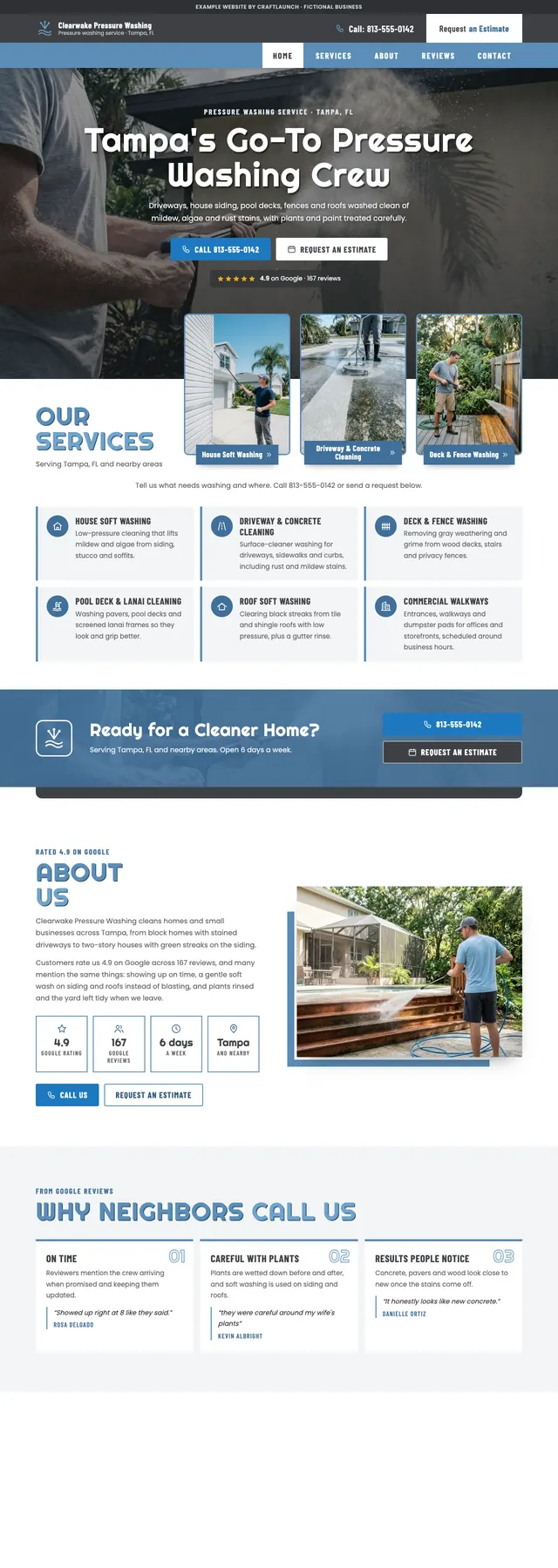
Sample pressure washing website design for Clearwake Pressure Washing, a fictional company in Tampa, Florida: charcoal top bar with a phone number, steel-blue menu, a full-width photo of a driveway being washed with the headline “Tampa’s Go-To Pressure Washing Crew”, three framed service cards and a request-an-estimate button.
Sample design · Tampa, FL · fictional business

Clearwake Pressure Washing

A steel-blue and charcoal layout with the phone number in a dark bar at the top and a “Request an estimate” button beside every call button. Six services get one plain sentence each, from house and roof soft washing to pool decks, lanais and commercial walkways.

Further down: a before-and-after slider you drag across a stained driveway, a “When to book a wash” row by season, then reviews, a request form, service area and map.

View the sample site
FAQ

Pressure washing website questions, answered

Still unsure? Email us at getcraftlaunch@gmail.com.

How much does a pressure washing website from CraftLaunch cost?

$69 once to design, write and launch your site, then $35/month for hosting, the SSL certificate, security updates, SEO upkeep and edits by our team. It is month-to-month with no contract: cancel any time and it takes effect at the end of the month you have paid for.

Can customers ask for a quote on the site?

Yes. Your site has tap-to-call buttons and a contact form, so a homeowner can call you or send a message saying what needs washing and where. If you are on a roof with the machine running, the message waits for you instead of turning into a missed call.

Can you put my own before-and-after photos on the site?

Yes, and we recommend it. Send us pairs from your real jobs and we place them where people decide whether to call. You can send new ones whenever you finish a good job; adding photos is part of the edits included in your plan. Shots taken from the same spot and angle work best.

Can I change my services or offers when the season changes?

Yes. Swapping a spring house wash offer for a fall gutter and driveway special, adding sealing or a commercial service, or updating your service area are all edits included in your plan. Send us a message and it is usually live in 2–3 business days.

Can you show my insurance and license details?

Yes. Tell us on the onboarding call what insurance you carry and any license or registration numbers you hold, and we put them where homeowners and property managers look. We only publish what you give us; we never invent credentials.

Will my pressure washing website rank first on Google?

No one can honestly guarantee a first-page ranking. We stick to what Google’s own guidelines allow: your city and services in every page title, your service area and map on the site, your business details marked up for Google and the site linked to your Google Business Profile. Results depend on your market and how established your business is.
Get the driveway job before the next crew does.

A pressure washing website built, hosted and kept up to date for you. $69 to launch, $35 a month, live in 1–3 business days. No contract.

Get My Pressure Washing Website Started
Your website, done for you: $69Then $35/mo for hosting, edits & support · no contract
Get started